News & Insights
The iPhone Duo Through the Lens of Adaptive Interfaces
October 21, 2026
By Nick Lee
When the iPhone Duo ships, most of the attention will center around the sheer novelty of the hardware. We’re interested in what it exposes about the software: how well today’s apps handle a device that can change shape and screen size while in use, and mid-interaction, and what that tells us about how prepared brands are for the next major platform change.
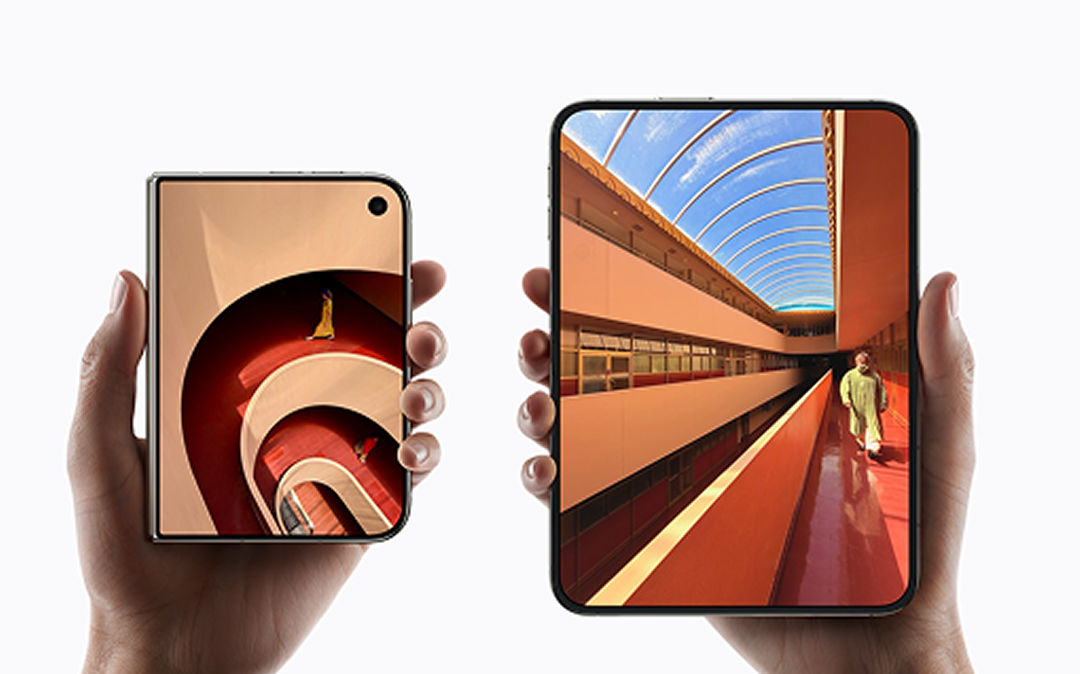
For most of the iPhone’s history, the phone’s shape has been a known quantity. Screen sizes changed, but “iPhone” always meant a compact interface designed around portrait orientation. While Apple’s first foldable will not be a day-one priority for every brand, the launch makes one thing clear: mobile products can no longer assume that “phone” means a fixed portrait UI. The same running app can move from a compact outer display to a 7.6-inch inner display, share that display with another app, or sit partially folded on a table.
Treating this as “we need to update our app for iPhone Duo” is the wrong framing. For brands in industries like retail, banking, travel, sports, and media that have invested heavily in their mobile customer experiences, the implications extend beyond supporting a new device. The real opportunity is to design mobile products adaptive-first: able to respond to whatever space the platform gives them. Apple is pushing developers in that direction now, and Google made the same move in 2025, when Android 16 began overriding fixed orientation and size restrictions on larger screens.
Why this moment is different
It’s critical that we don’t approach the Duo as the introduction of another breakpoint, like we all did when the iPad launched. Apple’s guidance is simpler than that: design around a compact and a regular width, then let the system handle the positions in between. Apps should not have a bespoke layout for every angle of the hinge.
In the Duo, a single pane can become two. Supporting detail can move alongside the primary task instead of behind another tap. In a tabletop pose, media can sit above controls on the lower half. Interactive elements need to stay clear of the fold, while continuous content such as an article or feed can pass through it. The craft lies in choosing which elements endure across every state and which elements evolve.
The transition matters as much as either endpoint. A static mockup can show closed and open states, but not whether someone loses their place between them. Opening the Duo is effectively a move from an iPhone layout to an iPad-like layout inside the same running session. Navigation state, typed input, playback, scroll position, and selections should all come with you.
This is also where custom interface work starts to show its long-term cost. Apple’s own navigation and toolbar patterns adapt to the Duo automatically. A bespoke tab bar or heavily branded control does not, whether it was built in Swift or a cross-platform framework.
Frameworks decide what your app inherits
The practical advantage goes to products that have stayed close to the platform. Native apps using standard Apple components inherit more of the Duo’s behavior automatically. Products that share business logic across platforms while keeping the interface native are close behind. That does not make native the right answer for every product, but it is a real advantage in moments like these.
React Native is different. Basic resizing is already part of the model, so the layout itself is not where we’d expect the biggest trouble. The harder bits are Duo-specific behaviors that sit closer to iOS: vertical system controls, multiple app windows, and outer-display camera experiences. Those may require native work or updated libraries. Custom UI remains its own problem: something like a hand-built navigation bar must be adapted whether the rest of the app is React Native or Swift.
Flutter and Compose Multiplatform present a more fundamental challenge. They render much of their interfaces themselves rather than relying on Apple’s standard controls, so when Apple changes how iOS looks or behaves, the frameworks have to catch up. That lag can be surprisingly noticeable. For example, over a year since iOS 26 shipped, Liquid Glass support in Flutter is still an open issue. As a result, a Flutter app can work perfectly on the latest version of iOS and still look like it belongs to last year’s operating system. For a consumer brand, especially a brand with Apple early adopters in its audience, that is a product quality problem that users immediately notice.
One of the old arguments for cross-platform UI is also getting weaker. Maintaining separate iOS and Android interfaces used to mean substantial duplicated engineering effort. Agentic coding tools are rapidly reducing that cost. They make every stack more efficient, but they do not remove the timing and control difference: native teams can use a new Apple capability as soon as the APIs are there, while framework-based teams may still need to build a bridge or wait. For new products, shared logic under native UI deserves a much harder look than it did a few years ago.
Where the form factor is most impactful
People will open the phone when the task needs more room, and your app’s job is to keep up. The strongest use cases are the ones where the task becomes richer or more complex after it starts.
- Commerce: A shopper can move from a product page into a two-column comparison or keep a size guide beside the item they are considering, without losing color, size, or cart state. The larger surface is useful when it changes what the user can do, not when it simply stretches the same product page.
- Media and creation: A propped Duo can keep video, a workout, or a live event above controls on the lower half. Camera and creator apps can use the outer display as a subject-facing preview or teleprompter while the capture interface stays on the inner display.
- Health and finance: The folded view can stay glanceable, while opening the device brings charts, related records, or deeper analysis into the same task. The same logic applies to analytics, travel, productivity, sports, and other products where useful context is routinely hidden behind another screen. More broadly, any product that struggles to present dense information on a small screen has something to gain.
What the Duo ultimately reveals
Not every brand needs to prioritize the Duo at launch, but its arrival should prompt a closer look at the assumptions built into today’s mobile experiences. Can an app adapt to a different screen without losing the user’s place? Can its navigation and content make use of the additional space? How much work will it take to support the next change to the platform?
These questions extend beyond the Duo, and the answers depend on decisions teams have made over years, from their design systems and underlying architecture to their choice of frameworks and custom controls. The Duo makes those decisions visible in the customer experience, sometimes in the middle of a single interaction. That makes its release a significant moment for mobile product teams, no matter how many people actually buy one.
About the author
Nick Lee is a technology leader at Work & Co, building consumer software, AI tools, and digital products for brands like Gatorade, Audacy, BNP Paribas Open, and many more. Over the last dozen years, he has delivered more than 80 best-in-class web mobile and mobile experiences that have reached millions of users.
Stay informed
Get occasional updates about our digital products, news, and events.